Guide · Email · ★★☆☆☆
Free custom domain email with Cloudflare and Gmail
Receive mail at your own domain with Cloudflare, send it from Gmail, and let Claude Code check the DNS for you. No paid plan.
By Arthur Hsiao · Last updated · 6 min read
The idea. This is not a mail server. Cloudflare forwards mail sent to you@yourdomain.com into your Gmail. Gmail then sends replies as that address using a "Send mail as" alias. Both parts are free.
This is how arthurh@ahdevstudio.com works. Checked on 14 November 2026.
1Receive mail with Cloudflare Email Routing
Your domain needs to use Cloudflare's DNS. Then:
- In the Cloudflare dashboard open your domain, then Email, then Email Routing.
- Create an address, for example
you@yourdomain.com, and set the destination to your Gmail address. - Cloudflare emails your Gmail a verification link. Click it. Nothing is forwarded until you do.
Cloudflare adds the MX and SPF records for you. On the free plan the limits are 200 rules per domain and 200 destination addresses per account, and a message can be at most 25 MiB. That is plenty for one person.
2Check the DNS with Claude Code
Ask Claude to look instead of reading the dashboard yourself:
Run nslookup for the MX and TXT records of ahdevstudio.com, and for _dmarc.ahdevstudio.com.
Tell me what each record does and what is missing.
Claude ran these commands. The real output for this site:
ahdevstudio.com  MX preference = 3,  mail exchanger = route3.mx.cloudflare.net
ahdevstudio.com  MX preference = 7,  mail exchanger = route2.mx.cloudflare.net
ahdevstudio.com  MX preference = 72, mail exchanger = route1.mx.cloudflare.net
ahdevstudio.com  text = "v=spf1 include:_spf.mx.cloudflare.net ~all"
_dmarc.ahdevstudio.com  Non-existent domain
What it means:
- MX says who receives mail for the domain. Three Cloudflare servers, tried in order of the lowest number.
- SPF says who may send mail for the domain. It lists Cloudflare only. It does not list Google. Mail you send from Gmail is checked against gmail.com instead (see the warning in step 5).
- No DMARC record. Nothing tells receivers what to do when SPF or DKIM do not line up. Adding one with a
p=nonepolicy is a safe start, but this site does not have one yet. Do not go stricter thanp=nonewith this setup: mail you send from Gmail would fail it.
3Make an app password
Gmail will not accept your normal password for sending. You need an app password.
- Turn on 2-Step Verification in your Google Account first. Without it, Google does not offer app passwords at all.
- In Google Account settings, search for app passwords and create one. Name it anything.
- Copy the 16 characters. Google shows them once.
This works for a personal Gmail account. A Google Workspace account follows rules set by its admin.
4Send as your domain from Gmail
In Gmail go to Settings, then See all settings, then Accounts and Import, then Send mail as, then Add another email address.
- Enter your name and
you@yourdomain.com. Leave Treat as an alias ticked. - Fill in the SMTP form with these values:
| Field | Value |
|---|---|
| SMTP server | smtp.gmail.com |
| Port | 587 |
| Username | your full Gmail address |
| Password | the app password |
| Security | TLS |
- Gmail sends a confirmation mail to
you@yourdomain.com. Cloudflare forwards it back to your inbox. Open it and click the link.
Check the SMTP server before you save. Gmail fills in the SMTP server from your domain. When I added arthurh@ahdevstudio.com, it showed a Cloudflare server. That one will not work. Cloudflare Email Routing only receives mail. Change the server to smtp.gmail.com and the port to 587, then save.
Cloudflare also has a separate product for sending mail, Email Service. This guide does not use it.
5Test it
Write a new mail in Gmail, open the From drop-down, and pick you@yourdomain.com. Send it to another address you own.
I did this on 13 November 2026 to a Gmail address. It arrived from arthurh@ahdevstudio.com, with the signature.
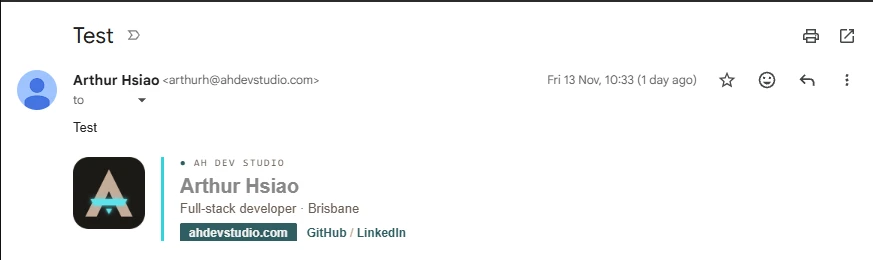
Know the limit. Mail sent this way goes out through Gmail's server, so it is signed by gmail.com, not by your domain. DKIM and DMARC do not line up with your domain. My test to Gmail arrived. I did not test Outlook or other providers, so I cannot tell you where it lands there. If your mail must always arrive, check with a test and look at a sending service built for it.
If a mail does land in spam, give Claude the full headers (in Gmail: the three dots, then Show original) and ask:
Here are the headers of a mail that went to spam. Read the Authentication-Results lines
and tell me which check failed: SPF, DKIM or DMARC. Explain it in plain words.
6Let Claude draft replies from the new address
Once the alias works, Claude can write drafts for you. See how to connect Gmail to Claude Code. Keep the rule from that guide: say "draft" every time and send it yourself.
If you host the site on Cloudflare too, see how to deploy an Angular site to Cloudflare for the rest of the setup.