Guide · GitHub profile
How to make a fancy GitHub profile README with Claude Code
Set up the special profile repo, then let Claude Code build animated SVG banners, themed sections and badges that GitHub actually renders.
Last updated
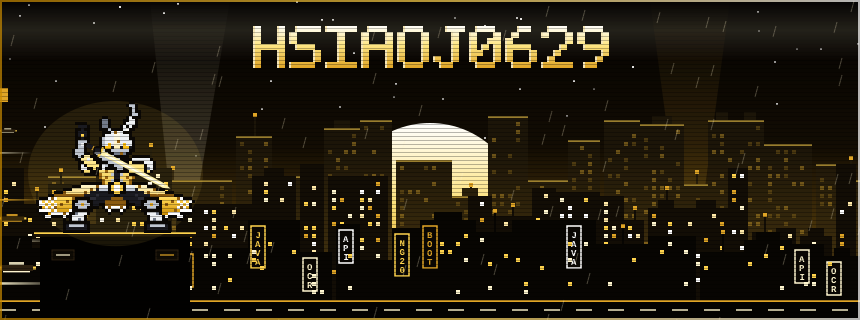
README.md of one special repo on your profile page. GitHub strips scripts and <style> tags from READMEs, but an SVG loaded through <img> keeps its own animations. So the "fancy" parts are SVG files that Claude Code generates, and the README just stacks them. 1Create the profile repo on GitHub
The repo must have exactly your username as its name and be public. Mine is HsiaoJ0629/HsiaoJ0629.
- On GitHub, click New repository.
- Type your username as the name. GitHub shows a note that it's a special repository.
- Set it to Public, tick Add a README file, and create it.
Or do it from the terminal with the GitHub CLI:
gh repo create YOUR-USERNAME --public --add-readme --clone
Open your profile page. The README now shows above your pinned repos.
2Give Claude the rules GitHub plays by
Start Claude Code in the repo folder and tell it the limits first. Otherwise it writes CSS or JavaScript that GitHub silently removes.
This repo is my GitHub profile README. GitHub strips <script>, <style> and inline style
attributes, and SVGs shown with <img> can't load web fonts. Keep everything to Markdown,
simple HTML (div align, img, table) and self-contained SVG files in assets/.
| Works in a profile README | Gets stripped or blocked |
|---|---|
Markdown, tables, <div align="center">, <img>, <table> | <script>, <style>, style="", iframes |
SVG with <animate> or CSS animation inside the SVG | Web fonts inside the SVG (they don't load) |
Images in the repo, linked by relative path (assets/city.svg) | Anything that needs JavaScript to run |
3Pick one theme and name every section after it
A theme is what makes a profile memorable. My first version looked like a game's character-info window. The current one is a cyberpunk "netrunner" city. Every heading follows the theme:
## ⚡ CYBERWARE LOADOUT   <- tech stack as equipment slots
## 💾 SKILL TREE         <- skills with levels
## 📡 GIG LOG            <- results, written as completed gigs
## 📟 COMMLINK           <- contact
The facts underneath are normal CV content: stack, skills, results. The theme only changes the labels.
4Have Claude write a generator, not the SVG by hand
The banner has 169 <animate> tags, which is painful to edit by hand. For the first version, Claude wrote a small Python script (gen.py) that outputs the SVG. A prompt along these lines works:
Write a Python script that generates assets/city.svg: an 860x320 animated cyberpunk
pixel city skyline with my username as a neon title. Use only SVG <animate> and
<animateTransform> for motion, no CSS and no JavaScript. Then run it.
The pixel character is a small colour map: each letter is a colour, and the script turns every cell into a <rect>. Animations are plain SVG. A flickering neon title, for example:
<text x="430" y="120" fill="#ffe680" filter="url(#glow)">HsiaoJ0629
  <animate attributeName="opacity" values="1;.4;1" dur="3s" repeatCount="indefinite"/>
</text>
Change the text or colours in the script, run it again, and the SVG is rebuilt. Claude also checked the output parses as XML before I committed:
python -c "import xml.dom.minidom as m; m.parse('assets/city.svg'); print('ok')"5Use system fonts inside the SVG
An SVG shown as an image can't fetch fonts, so a Google Font in the SVG would fall back to the browser default on GitHub. Every text element in my banner uses a monospace system font stack instead:
font-family: 'Courier New', Consolas, 'Lucida Console', monospace
6Add badges and dividers
Badges come from shields.io: a plain image URL, colours picked to match the theme.
<img src="https://img.shields.io/badge/DISTRICT-Brisbane_AU-e0a526?style=for-the-badge&labelColor=1a1206" />
Between sections I use a thin animated divider.svg (2 <animate> tags, under 5 KB) instead of a Markdown rule.
7Preview, then push
Open each SVG in Chrome before pushing. It's the quickest way to see the animation. Then commit and push:
git add README.md assets/
git commit -m "Animated profile banner"
git push
If the profile still shows the old image, hard-refresh: GitHub caches images for a short while.
alt, like alt="Netrunner profile: Arthur (HsiaoJ0629), Full Stack Netrunner from Brisbane, AU". Want Claude to remember the GitHub rules for next time? Put them in the repo's CLAUDE.md. See CLAUDE.md best practices.